



PRACTICAL KNOWLEDGE
PEmicro GDB Server - ARM Cortex-M Microcontroller
The PEmicro GDB server now supports flow control and FLASH programming of many ARM devices using GNU GDB debugger tools in addition to PEmicro's hardware interfaces.
Read article
STMicroelectronics' STM32CubeIDE is an Eclipse-based enablement platform that supports code development and debugging on STM32 ARM microprocessors. PEmicro Hardware Interfaces: Multilink and Cyclone can be leveraged for advanced debugging capabilities via an Eclipse GDB plugin available for installation into any Eclipse IDE from the PEmicro update site (http: //www.pemicro.com/eclipse/updates) is freely available. This blog shows the steps required to install and configure PEmicro Multilink and Cyclone debug support in STM32CubeIDE before starting a debug session.
| Installation progress | Frequency |
| 1. Install the PEmicro GDB server for the Arm device plugin | Once Total |
| 2. Create a launch configuration | Once per project |
a.) Start STM32CubeIDE and proceed with Help -> Install New Software to invoke the plugin installation and update wizard.
b.) Check the GNU ARM PEMicro Interface Debugging Support and PEmicro ARM Device Expansion Plugin checkboxes and click the Next button.
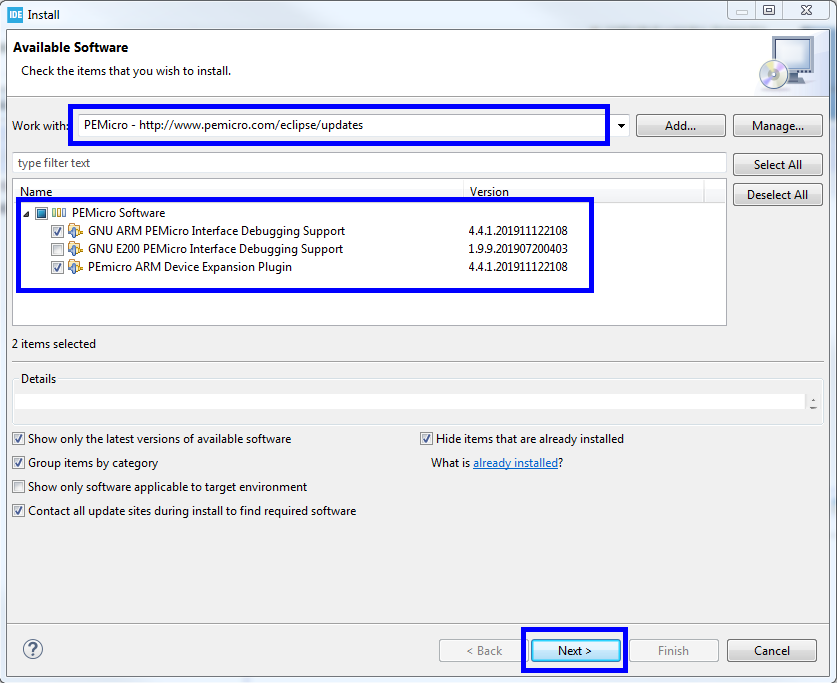
Figure 1. Plugin installation wizard
c.) This will install support for PEmicro's Multilink and Cyclone hardware into STM32CubeIDE. A dialog box appears prompting you to restart STM32CubeIDE. Click Yes.
a.) It's incredibly easy to start a debug session from PEmicro's debug probes with STM32CubeIDE. Open a project of your choice and enter the debug configuration manager:
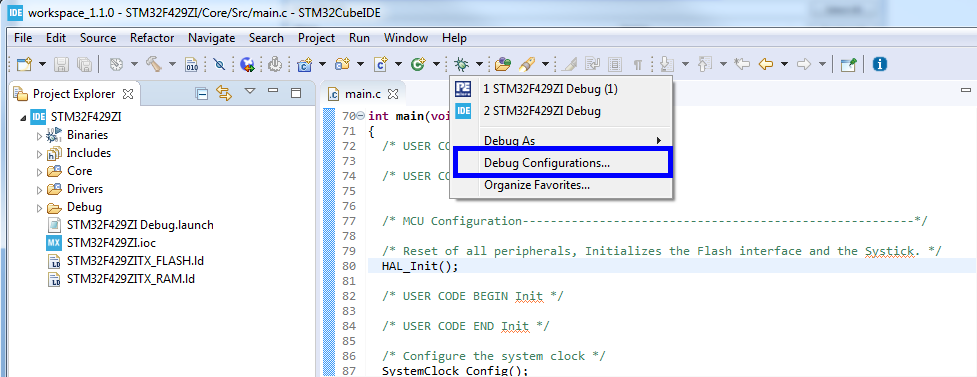
b.) This opens the dialog where the startup settings are configured. PEmicro interfaces require a dedicated boot debug configuration, which can be created first by double-clicking on the GDB PEMicro Interface Debugging category in the left pane.
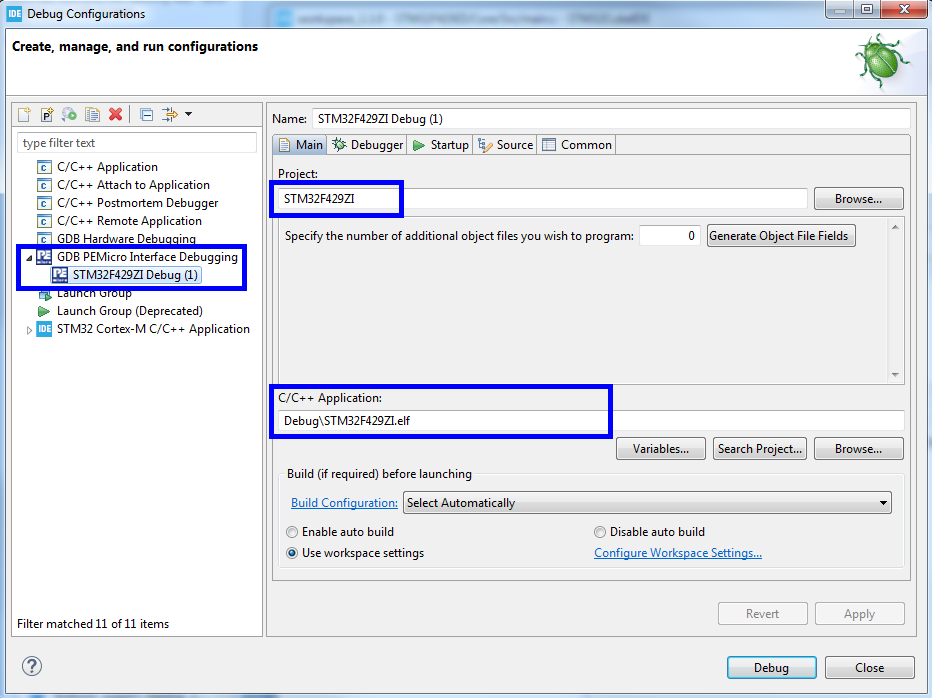
After the PEmicro boot debug configuration has been created, on the Main tab navigate to a current project as well as a C/C++ application .elf file that you wish to debug.
c.) On the Debug tab, the user may want to change many startup settings to control the following features:
For a complete list of features, see the PEmicro plugin documentation (http://www.pemicro.com/downloads/download_file.cfm?download_id=482).
The user should properly configure at least the following settings to start a debugging session:
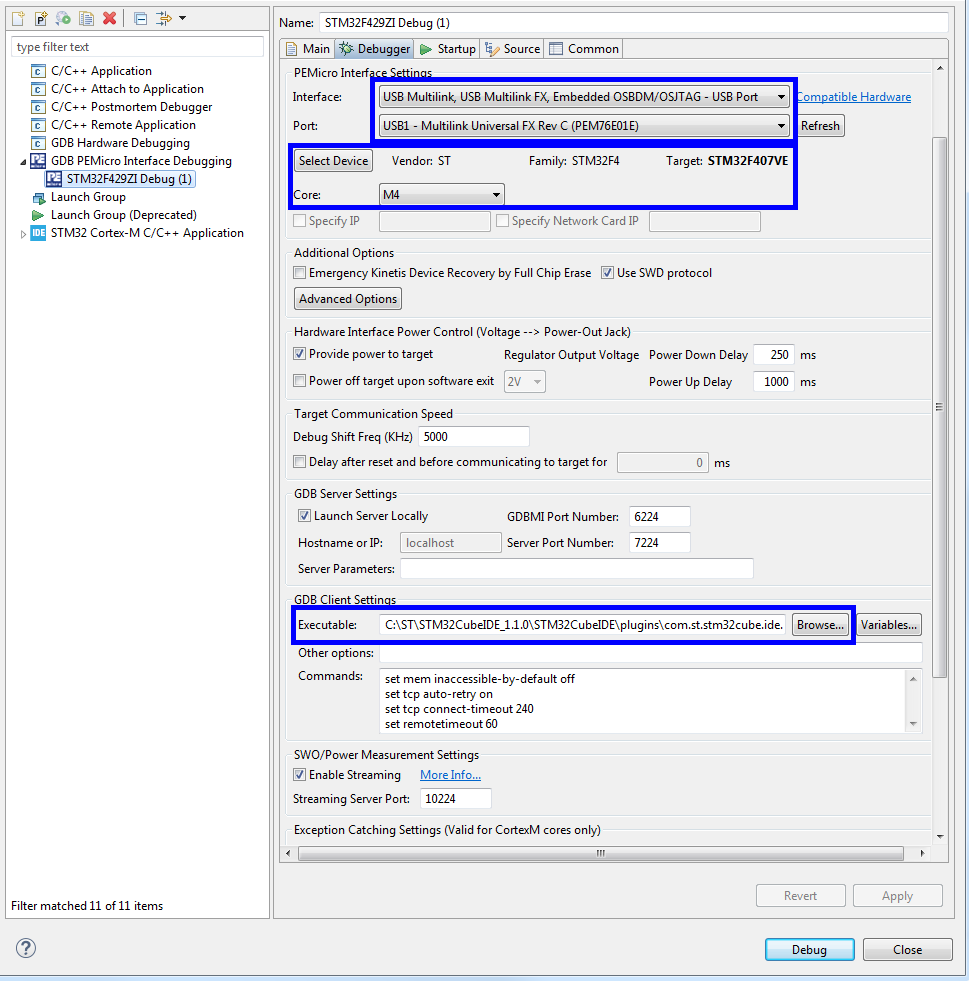
Figure 4. PEmicro debug configuration settings
Wenn eine neue Start-Debug-Konfiguration erstellt wird, sollte der Benutzer zunächst die zu verwendende Debug-Hardwareschnittstelle auswählen. Der PEmicro GDB-Server unterstützt Debug-Verbindungen über die USB Multilink-Debug-Sonden von PEmicro sowie Cyclone-Programmierer über USB und Ethernet.
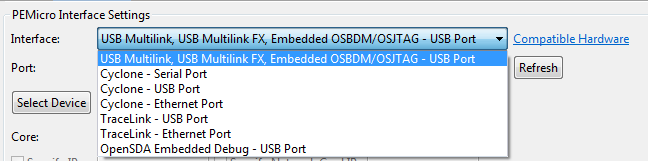
Figure 5. PEmicro debug interface selection
PEmicro's USB and local Ethernet devices are automatically detected. Remote networked Ethernet debug interfaces can be specified by their IP address.
Next, the user should select a specific STM32 MCU device to debug and program.
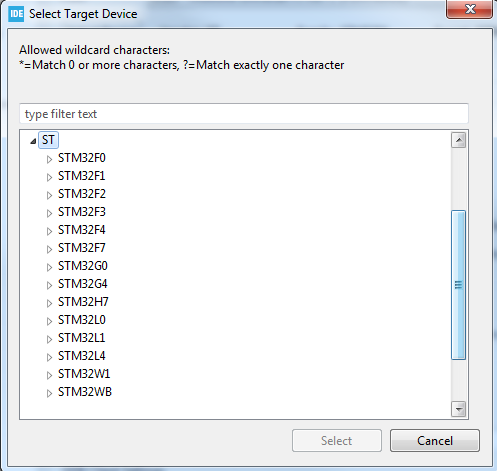
Figure 6. STM32 device tea selection
When creating a new debug configuration, the user should ensure that a path to a GDB client is specified under GDB Client Settings in the debug configuration. STM32CubeIDE comes with a preinstalled GNU plugin for external tools: com.st.stm32cube.ide.mcu.externaltools.gnu-tools-for-stm32.7-2018-q2-update.win32_1.0.0.201904181610. Therefore, point to the GDB Client Setting text box with a direct path to the arm-none-eabi-gdb.exe client. Please note that the actual path depends on the version of the plugin as well as the location of your STM32Cube installation directory (STM32CubeIDE\plugins\com.st.stm32cube.ide.mcu.externaltools.gnu-tools-for-stm32) may vary. 7-2018-q2-update.win32_1.0.0.201904181610\tools\bin\arm-none-eabi-gdb.exe).

Figure 7. GDB Client Path
Once these debug settings are complete, a debug session can be started by pressing the debug button.
PEmicro's Eclipse-based GDB Server Plugin allows developers to use PEmicro's Multicink and Cyclone interfaces to program and debug ARM and PowerPC processors in a wide variety of Eclipse-based IDEs . PEmicro Eclipse GDB Plugins for ARM and PowerPC devices provide the ability to quickly develop and debug code for STM32 ARM and SPC5 ST PowerPC devices.


CONTINUE EXPLORING
PRACTICAL KNOWLEDGE
The PEmicro GDB server now supports flow control and FLASH programming of many ARM devices using GNU GDB debugger tools in addition to PEmicro's hardware interfaces.
Read articlePRACTICAL KNOWLEDGE
As part of the Cyclone Control Suite, PEmicro includes a graphical application called Cyclone Control GUI.
Read articlePRACTICAL KNOWLEDGE
This article describes how to read the device ID from memory using the Aardvark adapter.
Read articleFROM READING TO YOUR PROJECT
Describe your signal, interface or test objective. Our team can help you assess the equipment and next steps.